A place for you to learn, get inspired, and keep up to date with all things SmugMug and photography




The Collect feature has been added to the Direct subscription plan. This feature gives site owners the ability to display a photo in multiple galleries without having to upload additional copies.
Creating new galleries is faster and more intuitive. When you create a gallery, the title field is automatically pre-filled and highlighted, so you can either keep it as is or instantly start typing your own title without any extra steps. It's a small change that saves you time with every gallery you create.
iOS 4.13.29 This iOS update brings a more stable and reliable app experience. We've fixed several UI bugs and completed a major behind-the-scenes modernization of the app's foundation. The result? a stronger, more resilient app that's built to keep up with future improvements for years to come.
Owners prompted for download password. Fixed an issue where owners could be prompted for the Download Password on their own password protected galleries.
Lightbox image flickering resolved. Images you've already viewed would sometimes flicker when revisiting them in the lightbox. That's fixed, so your photos display smoothly and beautifully every time.
Lightbox text overlays now display cleanly across the full image. No more visual gaps or background bleed-through– your captions and details look polished and seamless.
Auto backup no longer stalls on deleted photos. When an auto-upload is queued, the app now skips files you had removed from your iPhone so your backup completes successfully.
Bulk photo management on Android is now more reliable. Deleting multiple items from your library works smoothly even while content refreshes in the background.
Android 4.13.9 brings a smoother, more stable experience with improved reliability, more dependable background uploads, and a fix ensuring saved SmugMug items aren't swept into your auto backup. We also modernized the app under the hood for better performance moving forward.
Android 4.13.10 delivers a smoother, more responsive experience. Multi-selecting items in your library now works seamlessly while content refreshes in the background, and overall app stability and navigation are more fluid and reliable throughout your session.
Mac Uploader is now more rock solid. We strengthened how the app handles auto-upload folders during updates, so your photos keep flowing to SmugMug without interruption. It's part of our ongoing effort to make the uploader a tool you can set and forget with confidence.
SmugMug Mac Uploader 2.7.1 is available now with bug fixes and an improved experience for uploading folder structures from Finder. If you organize your shoots in nested folders with a mix of subfolders and photos, the app now handles them more cleanly, keeping your upload workflow as organized as your files already are.
HEIC photos now display with true, accurate color. Photos shot in HEIC format and uploaded via the mobile app now render with the rich, faithful colors you captured. Your images look their best on your site, exactly as you intended.
Source renewal emails now show the correct billing price. Your renewal confirmation email now clearly reflects exactly what you were charged, so there's no second-guessing when it lands in your inbox.
Guest and participant accounts can now set up MFA. Securing an account shouldn't be limited by account type. Guest and participant accounts can now fully enable, disable, and manage multi-factor authentication, giving everyone on the SmugMug network the same level of account protection.
Gallery download emails now delivered to account owners. Downloading your own gallery while logged in now reliably delivers the ZIP link to your inbox, every time.
Background videos now play in Chrome. Your cinematic page backgrounds now display consistently across all major browsers, so more of your visitors experience your site exactly the way you designed it.
The Collect feature has been added to the Direct subscription plan. This feature gives site owners the ability to display a photo in multiple galleries without having to upload additional copies.
Creating new galleries is faster and more intuitive. When you create a gallery, the title field is automatically pre-filled and highlighted, so you can either keep it as is or instantly start typing your own title without any extra steps. It's a small change that saves you time with every gallery you create.
Your app is more reliable. We've eliminated crashes that interrupted your work and fixed issues preventing automatic uploads, so your memories and files are now safely preserved without you having to worry. The new vertical disk usage chart gives you a clearer picture of your storage with a beautiful redesign and visibility into more locations.
We've reduced the app's storage footprint on your device. The app was consuming far more space than it should, and we've fixed that so you get your precious storage back for the things that matter to you.
Auto Upload no longer gets stuck on incompatible files. Previously, a single video that didn't meet size requirements could block your entire photo library from backing up. Now the app skips problematic files and continues uploading everything else, so your memories are always protected.
We've improved our ability to diagnose and resolve the "Not Enough Space" error that was affecting some users. With enhanced logging, we can better understand these situations and work toward ensuring Auto Upload runs smoothly for everyone.
We've fixed crashes that were happening while your photos were uploading. The app was working too hard and shutting down unexpectedly, interrupting your uploads and your work. Now everything runs smoothly in the background without shutting down the app.
We've resolved issues causing Auto Upload to stall partway through. Some customers found uploads making good progress initially, then slowing or stopping completely. We've fixed this so your entire library now uploads consistently.
US Android customers can now sign up and subscribe directly through links in the app. This makes it easier and faster to get started or upgrade your account—simply tap and complete your subscription in your device's browser. No more workarounds or extra steps, just a streamlined experience that gets you access to the features you need.
We've fixed crashes on Samsung S25 devices caused by oversized folder thumbnails. The app was attempting to load thumbnail images that were far too large for display, causing it to crash when you browsed your folders. We've corrected this so thumbnails now load at the right size—keeping your browsing quality smooth, and quick.
We've resolved an issue where Lightroom wasn't automatically notifying you of SmugMug plug-in updates. Even when updates were available, you weren't seeing the prompt to install them—forcing you to manually check the plug-in manager yourself. Now Lightroom will properly alert you when new versions are ready, so you can keep your plug-in current without having to remember to check manually.
We've fixed the issue blocking 320 x 240 videos from uploading. This legitimate older size was being incorrectly rejected as too small. Now you can upload content from any source without that size restriction, preserving all your memories regardless of when they were captured.
iOS auto upload now works without interruptions: We've fixed the "Paused not enough space" error that was stopping your photos from uploading automatically on iOS. Your images now flow seamlessly from your device to your galleries, so you can focus on capturing moments instead of troubleshooting upload issues.
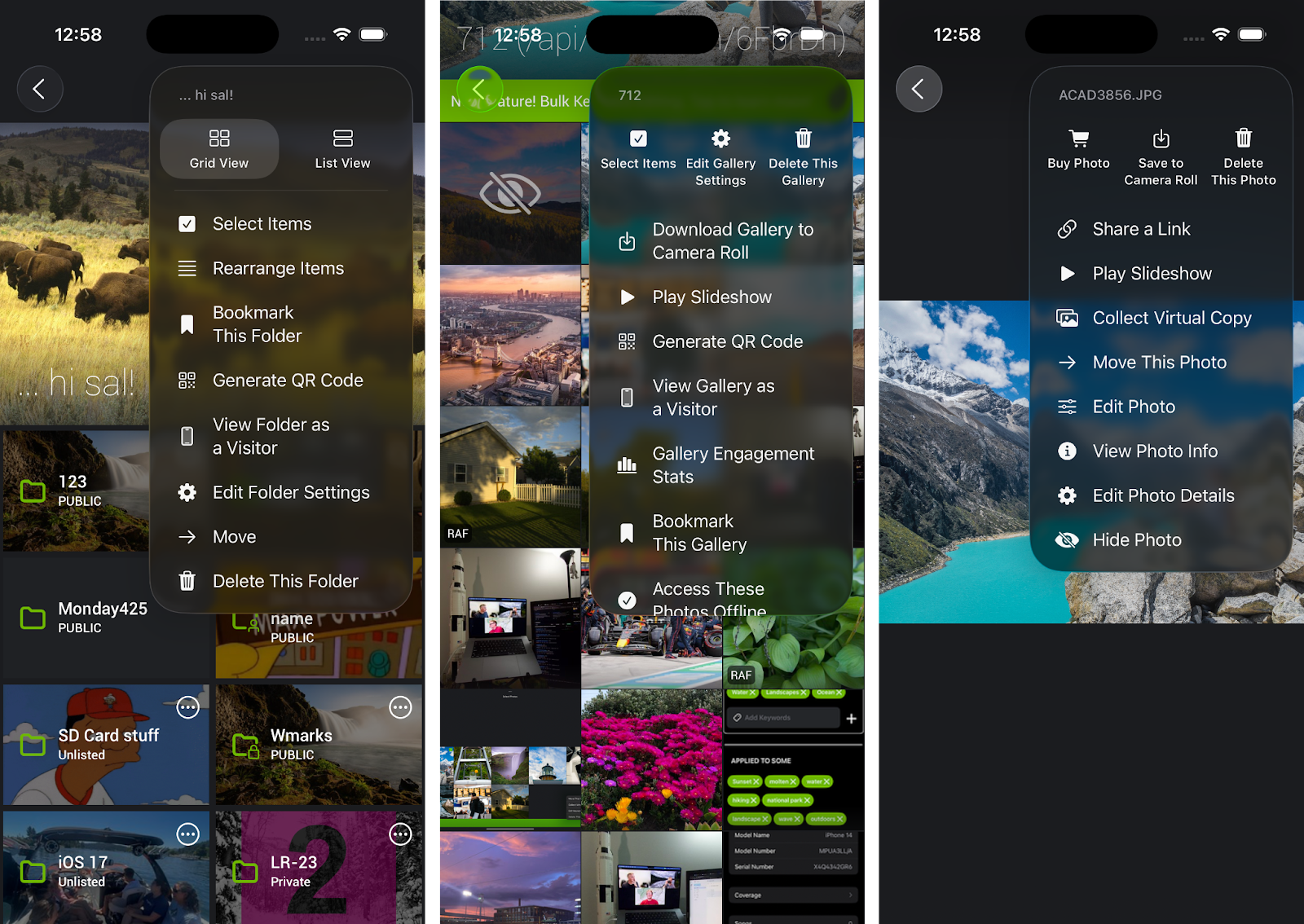
Streamlined menu layout for faster access: We've reorganized the iOS App menu in Folders, Galleries, and Lightbox views to put your most-used tools front and center, helping you work more efficiently.
macOS app now launches reliably: We've resolved an issue that was causing the macOS app to crash at launch in version 2.4.3, so you can now open the app smoothly and get straight to what matters – serving your clients and managing your workflow without interruption.
Lightroom Publishing Manager now connects smoothly to SmugMug: We've resolved an internal error that was blocking you from adding SmugMug service in Lightroom's Publishing Manager after recent Lightroom updates. You can now set up your publishing workflow seamlessly and get back to efficiently delivering your work to clients without issue.
Fujifilm keepsakes now available at all listed sizes: We've fixed an issue that was preventing certain Fujifilm keepsakes from being ordered at their minimum dimensions. The minimum print resolutions are now added, so you can confidently offer your clients the product sizes desired while ensuring every order meets the quality standards that your work deserves.
.png)
Get personalized guidance with our experts - Whether you're launching your first site, setting up pricing for sales, or maximizing photo protection, our SmugMug Success Sessions give you hands-on help tailored to your specific goals. Skip the trial-and-error and start seeing results faster with a dedicated expert by your side.

We've made it easier than ever for your clients to buy the photos they love.
Previously, when clients searched for their photos in your galleries, they had to navigate away from the search results to make a purchase. Now, they can buy photos directly from the search results page—no extra work required!
What this means for you:
We made your W9 and payment information much easier to find in Site Settings, putting your essential financial details front and center. Now you can quickly access and update your tax information with less hassle.
Reliable feature image display - We fixed an issue where your feature images would vanish after navigating to folders. Now your images stay visible consistently, giving you uninterrupted visual context.
4.12.0
Faster downloads - Your photo download links are now faster and more reliable. We've proactively upgraded our system to ensure uninterrupted access to your photos with improved performance. No action needed—just noticeably better service when sharing with clients, family, and friends.
v2025.8.19.0
Smarter auto upload intelligence in Windows App - We enhanced our folder watching to prevent duplicate uploads when you edit photos or update metadata. This improvement works especially well with NAS or iCloud setups, giving you a cleaner, more reliable upload experience.
Windows App Upload Fix - We eliminated a frustrating duplicate image upload issue in the Windows app that was causing files to process multiple times. Now you can upload with complete confidence, knowing each file processes exactly once and your work will stay organized exactly as you intended.
This month's bug fixes clear away the friction points that were stealing your time, from billing to app performance, so you can focus on what truly drives your success.
Cleaner gallery interface - We removed the misleading share button from empty galleries that was causing confusion when there wasn’t anything to share. Now you'll see sharing options only when images are available to share. Makes sense right?!
Clearer invoice transparency - We corrected a confusing VAT issue that incorrectly showed an account renewal payment as "SmugMug Source." Now your invoices clearly reflect what you're paying for, making your record-keeping and expense tracking accurate.
Seamless billing access for Source users - We fixed a "Page Not Found" error that blocked you from updating your SmugMug Source billing information. Now clicking the billing update link takes you directly where you need to go to update your information.
Complete VAT documentation - We ensured VAT invoices now generate automatically for your download package orders, just like they do for print orders. You'll have consistent, complete tax documentation for all your purchases, ensuring you never miss important invoice details.
Enhanced email reliability - So you never miss critical account notifications, we resolved an extremely rare scenario where account-related emails were not being sent. Account owners can now count on receiving every important update and alert in their inbox, keeping you connected to your business operations.
Our new Customer Leads feature keeps you informed at every step of your customer's journey, so you can follow up at the perfect moment and close more sales. You'll have convenient access to recent purchases, gallery subscriptions, contact info, and customer details that help you build stronger relationships and grow your business. Spend less time searching for information and more time creating amazing experiences for your customers.
4.12.16
iTunes subscription visibility: SmugMug accounts opened through Apple iTunes can now view their subscription status directly within the app, giving you instant access to your account details without leaving the mobile app experience.
4.12.17
Extended text editing navigation: We've expanded the previous/next buttons from the Edit Gallery/Folder screen to the Edit Photos Detail screen, making it even smoother to update your photo details by easily moving between text fields.
Improved login reliability: Fixed an issue where login buttons were missing on slow connections, ensuring you can access your account regardless of connection speed.
4.12.20
Enhanced content reporting: Added a Report Content option to the folder/gallery menu when viewing content you don't own, making it easier to maintain a safe community environment.
Behind-the-scenes improvements for faster support. We've made backend improvements that give our support team better tools to quickly resolve any issues you encounter. This means faster problem resolution and less downtime for your business when you need help.
4.11.7
Guest uploading controls: You can now enable/disable and set a key for Guest Uploading directly in Gallery Settings under Gallery Privacy Settings, giving you complete control over who can contribute content to your galleries.
4.11.8
Enhanced upload queue preview: You can now tap on photo/video thumbnails in the Upload Queue to view them fullscreen, making it easier to differentiate between similar images and quickly identify upload errors or duplicates.
4.11.9
Enhanced content reporting: We added a Report Content option to the folder/gallery menu when viewing content you don't own, making it easier to maintain a safe community environment.
V2025.7.7.0
Improved nested folder privacy handling: Reworked how privacy settings are applied when uploading nested folders through drag-and-drop or folder watching. Newly created folders now inherit their parent folder's privacy settings, while galleries use your default gallery preset, creating more predictable and consistent privacy behavior that matches the web experience.
Fixed Multi-Gallery settings popup issue. Selecting multiple galleries was displaying a blank, unresponsive settings pop-up, now it’s working as it should and you can efficiently update settings across multiple galleries without interruption.
We eliminated a frustrating Unlisted Gallery workflow issue. Site owners can now confidently share gallery links directly from the "View on site" button, knowing their guests will be able to access unlisted galleries without encountering 404 errors.
Clear shipping notifications that eliminate confusion. We fixed an issue where customers with US and Canadian items received misleading "full shipment" emails when only part of their order had shipped. Now there’s accurate "partial shipment" emails that clearly show which items are on their way and which are still processing. You'll always know your order status and can set proper expectations with your customers.
Smart email recognition delivers cleaner data - Site owners now enjoy more accurate Customer Lead tracking as our system intelligently treats emails with different capitalization as the same contact, eliminating duplicate entries and giving you a truer picture of your audience.

We're excited to announce the launch of Fujifilm lab in Canada! This has been one of our most requested features, and we're thrilled to finally bring local fulfillment to our Canadian subscribers. With this milestone addition, Canadian customers can now enjoy faster shipping and improved service, making it easier than ever to deliver beautiful prints to your clients.
Site and Organizer upgrades: Streamlined experiences that save you time.
We've made significant improvements to help you work more efficiently and provide better experiences for your customers.
Fixed Share button for Unlisted content: We resolved an issue where links from the new Organizer share button weren’t working for Unlisted folders and galleries, leading to 'Page Not Found' errors. You can now confidently share Unlisted content with specific viewers while keeping your privacy settings intact. For added security, the Share button remains hidden intentionally on Private galleries.

We’re thrilled to share some incredible early results from the Gallery Pre-Release updates we shipped a few weeks ago! Your success is always our priority, and it's clear these improvements are making a real difference for those of you utilizing this feature.
Sellers who adopted the new Gallery features achieved:
Site Dashboard enhancements: A clearer view of your success.
We’ve made the Site Dashboard even more powerful to help you stay on top of your business. With these new updates, you can quickly access the most important details about your sales, orders, and new galleries — all in one place.
4.12.11
Freshen up your Galleries with new feature images, now available in the iOS app!
To update your gallery’s feature image:
4.11.4
This update reduces clutter in the overflow menu and makes it easier to find and manage your feature images.
You can continue to set feature images (and cover images, if applicable) directly in the Gallery/Folder Settings.
2.5
No more hunting around — you can quickly navigate your entire SmugMug structure while uploading, saving time and making uploads smoother than ever.
We’ve streamlined the upload workflow with a fresh UI update! Now, when uploading photos, you’ll see all your galleries and folders listed in the sidebar, making it faster and easier to organize your uploads exactly where you want them.
This Lightroom Plugin update includes smoother uploads for Windows users.
This update fixes the “missing log file” issue on Windows, making your plugin experience more stable and reliable.
Where to get it:
Download directly from SmugMug Help Center
Or find it on the Adobe Marketplace
v2025.4.2.0
This update improves upload reliability, strengthens app security, and sets the foundation for faster improvements going forward — all helping your experience stay smooth and secure.
In this update, we fixed a bug for Source users where .xmp files appeared to fail, even though they uploaded successfully. Overall this update improves stability, modernizes the app’s core systems, and helps us deliver faster improvements moving forward. This improvement was made by upgrading the app to use newer, more reliable technology — the same trusted foundation that powers our Android app.
These bug fixes make it easier for you to stay connected with your customers and manage your sales more efficiently. Sending invites is now faster, followers are properly displayed on Pre-Release pages, and Pros are once again receiving real-time sales notifications. Overall, these improvements help you save time, stay informed, and maintain stronger relationships with your audience.
We fixed the lag when selecting contacts under "People I Choose" when sharing galleries. Now, your contact list loads instantly, making it quicker and easier to give many people access at once.
We’ve resolved an edge-case issue where followers weren’t appearing correctly on Pre-Release pages if a previously subscribed gallery had been deleted. Now, your follower lists display exactly as expected—ensuring you always have a clear, reliable view of who’s staying connected to your latest galleries.
We fixed an issue that was temporarily preventing digital downloads from orders from generating and delivering properly through the Request Zip button. Your customers can now access and download their purchased files smoothly and without delay. This means peace of mind, knowing your customers can instantly get what they paid for.

This month’s updates will make your workflow faster, clearer, and more connected.
From the launch of your new Account Dashboard to easier gallery follower management, we’re putting more control at your fingertips. Mobile uploads are more reliable, error messages are clearer, and key bug fixes are keeping everything running smoothly — so you can stay focused on your business.
Your new Account Dashboard is here — and it’s just the beginning.
We’ve launched the very first version of your new account dashboard, making it easier than ever to stay on top of what matters most to your business. And this is just the start. Throughout the year, we’ll continue to expand the dashboard with even more powerful tools and features — all focused on helping you run your business more efficiently and effectively.
New updates to Gallery Pre-Release make staying connected even easier.
Having one central place to manage your galleries with followers is a game-changer. That’s why we’ve introduced a brand new management page, now available in Selling Tools, designed to give you full control and visibility over every gallery that has followers.
From this page, you can now:
This update helps you build stronger relationships with your customers by making it easy to follow up, communicate, and turn interest into sales — all in one place.
4.12.8
We’re investigating auto upload interruptions — and taking action.
We’ve received some reports that auto-uploading occasionally pauses with a message about insufficient disk space. We know how important a seamless upload process is, especially when you’re on a deadline.
This latest update includes behind-the-scenes improvements to help us better diagnose what’s causing this issue. It’s a key step toward delivering a reliable, uninterrupted upload experience — so you can stay focused on your work without worrying about technical hiccups.
4.11.3
Clearer upload error messages to keep you informed.
We’ve updated the wording of certain upload retry error messages to make them more informative and accurate. These improvements are all about clarity — giving you the right information at the right time so you know exactly what’s happening and what to expect.
More bugs squashed — smoother sailing ahead!
Every fix we make is part of our commitment to delivering a faster, more reliable experience for you. This month, we tackled several behind-the-scenes issues to keep things running seamlessly. Here are a few highlights from this round of improvements:
Download data in your Gallery Engagement Stats is once again displaying correctly and in real time. If numbers looked delayed recently, rest assured — everything is now updating as it should, so you can rely on accurate insights when reviewing your gallery performance.
If you ran into hiccups while uploading from Dropbox, you’ll be happy to know the integration is fully restored. You can get back to your streamlined workflow without missing a beat.
We fixed an issue where very small images could cause errors in the Shop View. Your storefront is now better equipped to handle a variety of image sizes without any unwanted surprises.
There was a brief moment when Pros were receiving full profit even when a coupon was applied — not quite how it’s supposed to work. Our team jumped on it, and everything is now calculating correctly again.
Some of you may have noticed incorrect dates on your account receipts in Account Settings. That’s been corrected, so your records now reflect the right information.
Thinking about freshening up your design? You can now browse available fonts in the Customizer again without delay. Time to get creative!



